The .env file anyone could download.
The worst leaks on a PHP site are files anyone can download: a .env, a config backup, a debug log. Tuner finds them from outside and masks the secrets.
3 min read
Part 4 of 4Know before your clients do
Most of the damage I worry about on a small site needs no clever attack. It needs one request for a file that should never have been public.
A .env file with the database password and the payment key. A wp-config.php.bak someone's editor left behind. A debug.log full of file paths and warnings. A database dump in the web root from the last migration. Each one is a plain download. Anyone can ask for it. Bots ask all day.
How they get there
Nobody puts them there on purpose. A deploy copies the whole folder, .env included. A quick fix on the server leaves a backup copy next to the original. Debug logging is switched on to chase one bug and never switched off. The server would happily refuse those files if it were told to. Often it never was.
The odd part is that the live wp-config.php is safe in the same folder. The server runs it as PHP and sends back nothing. The copy ending in .bak is not PHP to the server, so it goes out as plain text.
Try it
Ask for what a stranger asks for
Pick a file in the shop’s public folder and send a plain request, the way a bot does all day. Then switch on the two server rules and ask again.
public_html/
Everything in here can be requested by name.
Response
Pick a file to send the request
Files a stranger can download5of 5
Then there is the slower risk. A plugin, a theme or PHP itself falls behind and a known vulnerability gets published for that exact version. The site does not change. The list of public weaknesses does.
What a stranger can find
Tuner (opens in a new tab) asks your site for what a stranger would ask for, with plain requests and nothing more. It looks for leaked files: .env, .git folders, config backups, SQL dumps, archives, error and debug logs, phpinfo() and more. It reads the versions of WordPress, plugins, themes, PHP and the web server. Then it matches them against public vulnerability data. Anything attackers are known to be using is flagged in plain words.
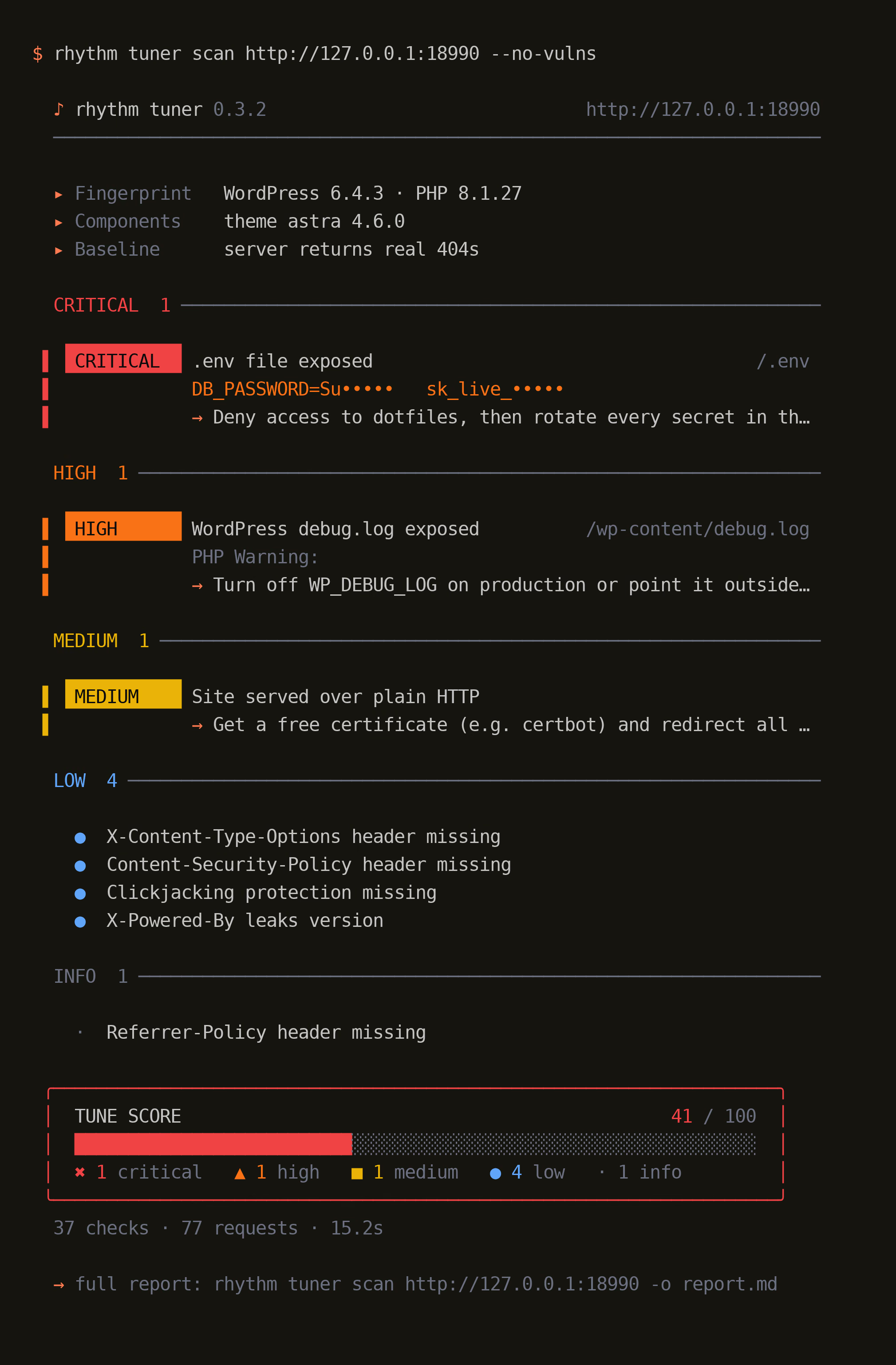
That is a real scan of a fake site on my machine. It found the exposed .env and showed only the start of each secret, the rest masked. It found the debug log, the plain HTTP and the missing headers. The files tab is the same scanner reading the site's folder on the server.
Every finding comes with the change that fixes it, for nginx, Apache or WordPress. The card shows the first line. rhythm tuner explain prints the whole fix, offline.
Old versions are the other half. On a site a few years behind, the matching advisories run into the hundreds. Tuner keeps one finding per component, puts what attackers are known to be using first and names the version to move to. The second tab is a fake site running old WordPress, PHP and Apache, narrowed to the actively exploited ones:
Two details keep it honest. Many servers answer every unknown path with a page that says 200 OK, so Tuner first learns how your site answers a path that cannot exist and ignores anything that looks the same. A version that a Linux distribution may already have patched is marked likely, not confirmed.
What it will not do
- It never sends an exploit. Every request is a plain GET, five a second by default.
- It masks the secrets it recognises, on screen and in every report. A value it does not know yet can still show, so treat a report as private.
- It is for sites you own or have permission to test. Scanning someone else's site can still be illegal.
Tuner is free and open source under the AGPL-3.0 licence. The code and the checks are on GitHub (opens in a new tab) and the whole set is on the open source page.
Next
Here is what I would do next
- Install the set and run
rhythm tuner scanon one site you own. - Fix every critical finding before you read the rest.
- Rotate any secret Tuner found in a public file. Deleting the file is not enough.
- Add
--fail-on highto your deploy so a new leak stops the release.