What your staging site really sends.
A staging copy of a shop still knows every customer. Echo seals it so nothing reaches real people, then shows what each form and order sends after an update.
4 min read
A staging site is a full copy of the real one. Same plugins, same settings, same database. That last part is the problem. The copy knows every customer, every subscriber and every phone number. It also still has the keys to the mail service, the SMS gateway and the CRM.
So it talks. A test order sends a real receipt. A refund during a test reaches a real customer. A password reset lands in a stranger's inbox. A newsletter goes out a second time, from the copy. Each of these is one plugin doing exactly what it was built to do.
Half sealed is not sealed
The usual fix is a plugin that turns off email on staging. It works for email. It does not stop the SMS plugin, the webhook to the CRM, the purchase event sent to analytics or the Slack alert. Every service the site talks to is its own way out.
Try it
Place a test order on staging
Pick what guards the copy, then place the order. Six messages go out. Count how many reach the real world.
Email
Order receipt to a real customerNot sent yetEmail
New order alert to the shop ownerNot sent yetSMS
Twilio text to the customerNot sent yetWebhook
New contact in the live CRMNot sent yetAnalytics
GA4 purchase in the live reportsNot sent yetChat
Slack alert to the teamNot sent yet
Then there is the opposite failure, the one nobody notices. A plugin update on the live site quietly stops the email to the shop owner. The customer still gets their confirmation. The page still says thank you. Nothing looks broken, so nobody looks. The owner finds out when an order sits unanswered.
One seal, every channel
Echo (opens in a new tab) sits between the site and the world. On WordPress, rhythm echo install wordpress writes one small plugin that catches every wp_mail() and every wp_remote_*() call. Laravel and Next.js have connectors of their own. Echo answers in each service's place, so the site carries on as if the email went out and the SMS was delivered. Nothing leaves the machine.
It knows the common services by name: mail APIs like SendGrid, Mailgun and Postmark, Twilio and WhatsApp for messages, Slack, GA4, Stripe and more. Anything it does not know is still caught, as a plain webhook. A live-mode call to Stripe, PayPal and six other payment gateways gets the gateway's own refusal, so a test can never charge a card through them. The connectors switch themselves off in production.
Before and after, side by side
Catching is half of it. The question I actually have after an update is whether the site still says what it said before.
So Echo keeps a baseline. You list the actions that make the site send things: submit the contact form, place an order, sign up. snapshot runs them and saves what each one sent. After the update, compare runs them again and shows only the difference.
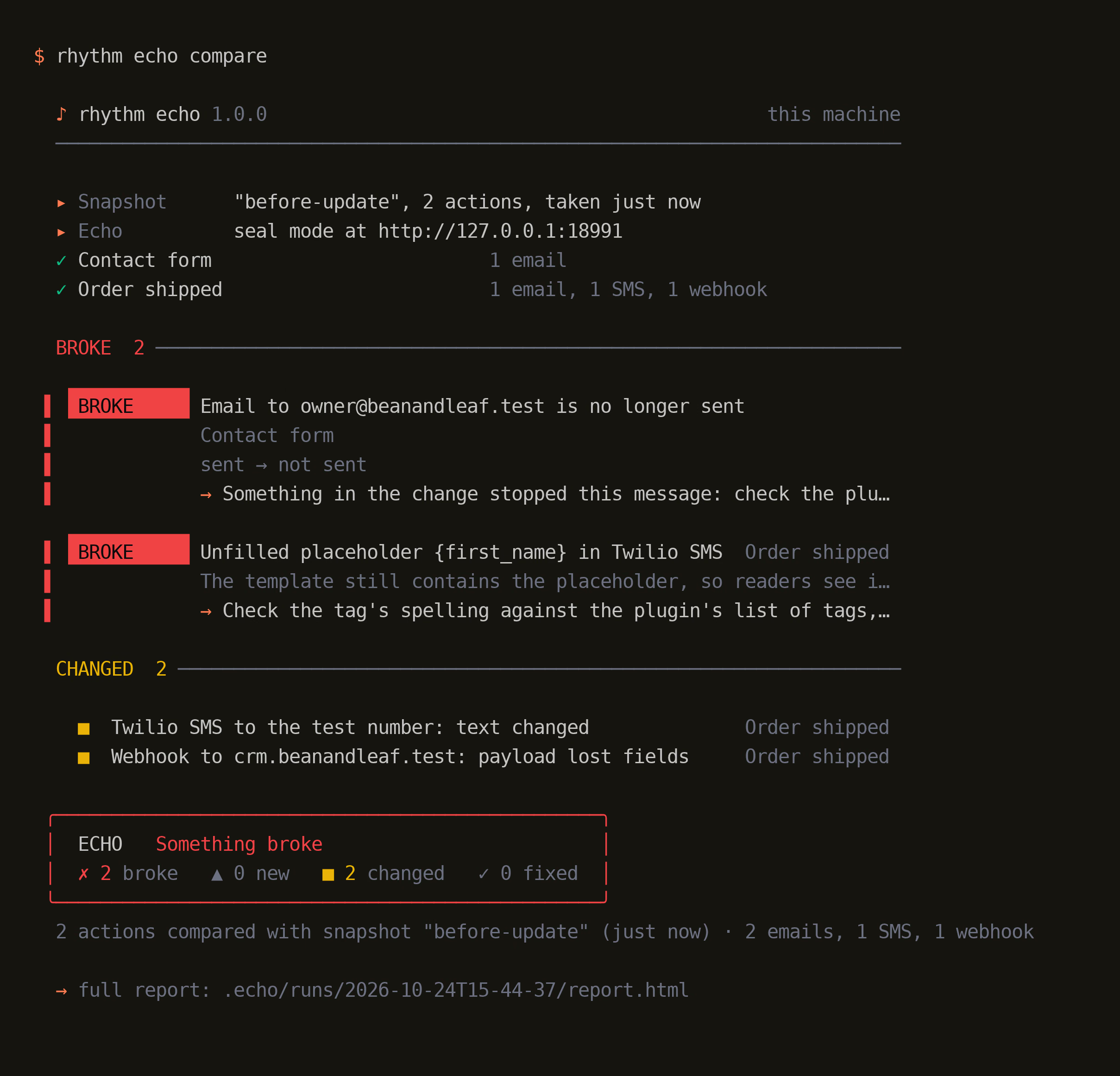
That is a real run on a test site on my machine. The update stopped the owner's email from the contact form. The order SMS now says {first_name} where a name should be. The webhook to the CRM lost a field. None of it shows on any page.
It also reads what is sent, not only whether it was sent. An unfilled placeholder or a PHP warning printed into an email is an error. A link that still points at staging is a warning. A message that went missing is the loudest line in the report.
What it will not do
- It never sends anything on to real people while it is sealing a site.
- It stores what it captures on your machine, with credentials masked first. The content itself is kept as sent, so treat it like a database dump.
- It does not guess at a service it does not know. It records the call as a plain webhook.
- It only sees what its connector hooks. Where a leak would really hurt, run the copy on a network where Echo is the only way out.
Echo is free and open source under the MIT licence. The code is on GitHub (opens in a new tab) and the whole set is on the open source page.
Next
Here is what I would do next
- Install the set and run
rhythm echo upon your staging machine. - Connect the staging copy of one site with
rhythm echo install. - List the three actions that matter most to the business, then take a snapshot.
- Compare after the next plugin update, before you tell the client it went well.